Sentiment Analysis of GitHub Comments
This project leverages Vertex AI to perform sentiment analysis on GitHub comment events using the public GitHub Archive dataset . Comment data is extracted from the dataset and analyzed with Vertex AI’s natural language processing capabilities to assess developer sentiment.
Project Overview
- Motivation: gaining hands-on experience with Google BigQuery for processing large-scale datasets and exploring the capabilities of generative AI for natural language sentiment analysis. By analyzing GitHub comment events from the public GitHub Archive dataset, the project provided a practical opportunity to combine data engineering skills with AI-driven text analysis in a real-world context.
- Data Source: GitHub Archive dataset (hosted on BigQuery), specifically
CommitCommentEventandIssueCommentEventevents. - Processing: SQL queries in BigQuery to extract relevant comment text
- Sentiment Analysis: Google Cloud Vertex AI (
gemini-2.0-flash-lite-001model)
Instruction to set up
Set up requirements before querying
1. Enable BigQuery API
2. Create Cloud resource connections
- Go to the BigQuery page
- In the Explorer pane on the left, click add Add data
- After the Add data dialog opens, select Business Applications in the Filter By left pane, under the Data Source Type section.
-
Or enter Vertex AI in the Search for data sources field on the right panel.
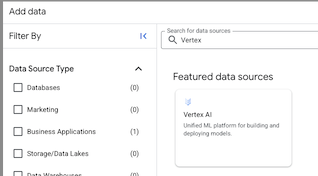
- Click on BigQuery Federation solution card.
- The External data source dialog pop up, select Vertex AI remote models, remote functions and BigLake (Cloud Resource) in the Connection type list
-
In the Connection ID field, enter a name for your connection. For example, I named my connection id as
bigquery_w_vertex_ai_connection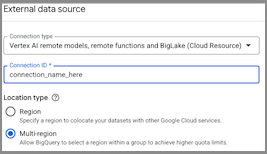
- Click Create connection.
3. Grant access to the service account
- Go to IAM & Admin page
- Select your current project, click Grant access
- The Grant access your project name dialog open, in New principals field, enter Service account id for connection you created in step 2
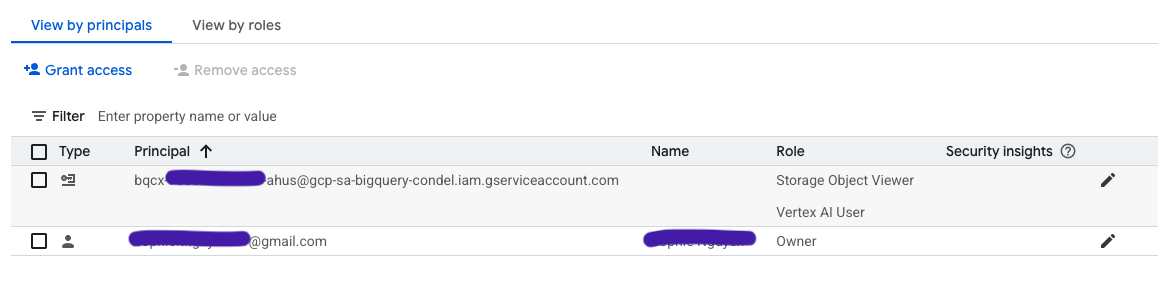
- In Assign roles section, select:
- Storage Object Viewer
- Vertex AI user
- Hit Save
- The IAM page would look like this, with the new created connection as added principal.
4. Create dataset
- Go to Bigquery page. In the Explorer pane, click your project name.
-
Click more (verticle three dots) > Create dataset
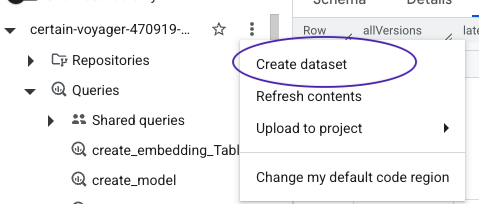
- On the Create dataset page, enter the name for dataset. Choose
US (multiple regions in United States)inMulti-regionfor Location type. Leave the remaining default settings as they are, and click Create dataset.
More information about the set up can be found here
Begin to do query
A. Create a remote model in BigQuery that utilizes a Vertex AI foundation model.
Syntax
CREATE OR REPLACE MODEL
`PROJECT_ID.DATASET_ID.MODEL_NAME`
REMOTE WITH CONNECTION `PROJECT_ID.REGION.CONNECTION_ID`
OPTIONS (ENDPOINT = 'ENDPOINT');
My PROJECT_ID is elaborate-truth-***,
DATESET_ID is sentiment_analysis
MODEL_NAME is gemini_pro
Then the sql to create model is:
CREATE OR REPLACE MODEL
`elaborate-truth-****.sentiment_analysis.gemini_pro`
REMOTE WITH CONNECTION `projects/elaborate-truth-****/locations/us/connections/bigquery_w_vertex_ai_connection`
OPTIONS (endpoint = 'gemini-2.0-flash-lite-001');
B. Extract message from github issue and commit events, for August 2025
CREATE OR REPLACE TABLE `elaborate-truth-****.sentiment_analysis.comment_partitioned`
PARTITION BY event_date AS
(
  SELECT
        type,
        DATE(created_at) AS event_date,
        repo.name AS repo_name,
        JSON_EXTRACT_SCALAR(payload, '$.comment.body') AS message
  FROM  `githubarchive.month.202508`
  WHERE type in ('CommitCommentEvent', 'IssueCommentEvent')
    AND JSON_EXTRACT_SCALAR(payload, '$.comment.body') IS NOT NULL
);
C. For each day of August 2025, perform sentiment analysis using for loop
- create result table first
CREATE OR REPLACE TABLE `elaborate-truth-****.sentiment_analysis.sentiment_anlysis_partitioned`
PARTITION BY event_date AS
(
    SELECT
        CAST('' AS STRING) AS type,
        CAST(NULL AS DATE) AS event_date,
        CAST('' AS STRING) AS repo_name,
        CAST('' AS STRING) AS message,
        CAST('' AS STRING) AS ml_generate_text_llm_result
    LIMIT 0
);
- batch processing
DECLARE prompt_text STRING;
SET prompt_text="For the given message classifiy the sentiment as Positive, Neutral or Negative.
The response must be only one word from the choices: 'Positive', 'Neutral', or 'Negative'.
Do not include any other text, punctuation, or explanation";

FOR record IN (SELECT distinct event_date
  FROM `elaborate-truth-****.sentiment_analysis.comment_partitioned`
  ORDER BY event_date)
DO

INSERT INTO `elaborate-truth-****.sentiment_analysis.sentiment_anlysis_partitioned` (
  type,
  event_date,
  repo_name,
  message,
  ml_generate_text_llm_result
)
WITH prompt_table AS (
  SELECT
    type,
    event_date,
    repo_name,
    message,
    CONCAT(prompt_text, message) AS prompt
  FROM `elaborate-truth-****.sentiment_analysis.comment_partitioned`
)
SELECT
  type,
  event_date,
  repo_name,
  message,
  ml_generate_text_llm_result
FROM ML.GENERATE_TEXT(
  MODEL `elaborate-truth-****.sentiment_analysis.gemini_pro`,
  (SELECT * FROM prompt_table),
  STRUCT(
    200 AS max_output_tokens,
    40 AS top_k,
    0.5 AS top_p,
    0.5 AS temperature,
    TRUE AS flatten_json_output
  )
);
SELECT 'Finished processing sentiment analysis for ' || CAST(record.event_date AS STRING);
END FOR;
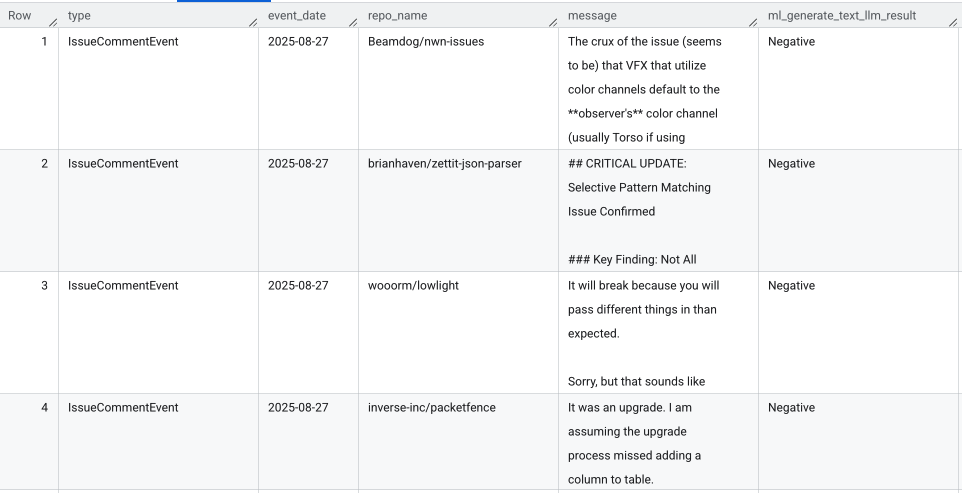
Example output (elaborate-truth-****.sentiment_analysis.sentiment_anlysis_partitioned table)
Analysis
SELECT type,
        ml_generate_text_llm_result,
        COUNT(*)
FROM `elaborate-truth-****.sentiment_analysis.sentiment_anlysis_partitioned`
WHERE ml_generate_text_llm_result IS NOT NULL
GROUP BY type, ml_generate_text_llm_result